Logfly 7: Evolution and Changes
Logfly is now a progressive web application. It can be accessed directly in your browser: logfly.app and can be installed just like a standard app.
It brings numerous improvements:
- Improved tag management
- 3D flight trace view
- Advanced multi-criteria search on the logbook
- Automatic site searching on Paragliding Earth
Why a Web Application?
It is increasingly problematic to install a program on Mac or Windows without going through the stores. To make your application available on the stores, you need to be a recognized developer. To become recognized, you must purchase expensive certificates.
Migrating to a web application allows us to bypass these problems. It also provides user comfort by dispensing with the installation process. However, building the application as a Progressive Web Application means that, if desired, it can be installed and used just like a standard app without having to open a browser. This installation of PWAs bypasses the problem with App Stores.
For more information on PWAs, consult this article: Progressive web apps.
The benefits are numerous:
- For development, fewer issues related to managing different operating systems, no more headaches generating installers, instant updates, etc.
- For users: non-obligatory installation, modules can be used individually (e.g., flight trace analysis without necessarily managing a logbook or installing the application).
Not Yet a Mobile Application
The Logfly web application is not yet a mobile app. This will become possible but requires significant interface adaptation work to access PWA status.
Security and Data Privatization
The Logfly application is loaded from the server, but during execution, there is no longer any connection with the server. The logbook data remains private, stored on the computer and never leaves it.
However, using a browser imposes more restrictive security measures and some modifications to user habits. But ultimately, this allows for an application that conforms to current standards.
Logbook
Justifiably, the browser cannot access user files without explicit consent. It never knows the exact file path of the loaded files. This means that the logbook will be loaded using a file selector, and the user must give permission. No longer can there be automatic logbook loading like in previous versions of Logfly.
We could perform a full migration and embed the logbook within the browser. However, to maintain data reliability and allow for the use of the log with older versions (5 or 6), it is preferable to manage a file accessible on the computer's hard drive.
For users of Chrome, Edge, or Opera browsers, the change will be minimal. There will only be one additional action compared to previous versions: at first use, choose the folder where the logbook is located and select the logbook from the list. From then on, each time you use it, it will simply ask for confirmation of opening the logbook. As soon as a modification is made, the logbook will be saved automatically in its original location.
This simplification is possible thanks to the presence of an API File System Access feature. At present, Safari and Firefox browsers do not have this feature implemented. Apple has not announced any intention to integrate it. For Firefox, there seems to be a plugin file-system-access (not tested). Consequently, for users of Safari and Firefox, it will be a bit more complicated. Without this API, no automatic saving; the user must perform an action to open the logbook and another to save it. Due to security reasons, the file selector will propose or save directly under a new name in the Downloads folder... It cannot access the Documents folder. The simplest solution is to leave the logbook in the Downloads folder.
It is recommended to use Chrome, Edge, or Opera for testing. If you are using Safari or Firefox, install Chrome. If you're allergic to Google, install Chromium. This browser is identical to Chrome but a project open source free from the commercial grip of Google.
Import Tracks
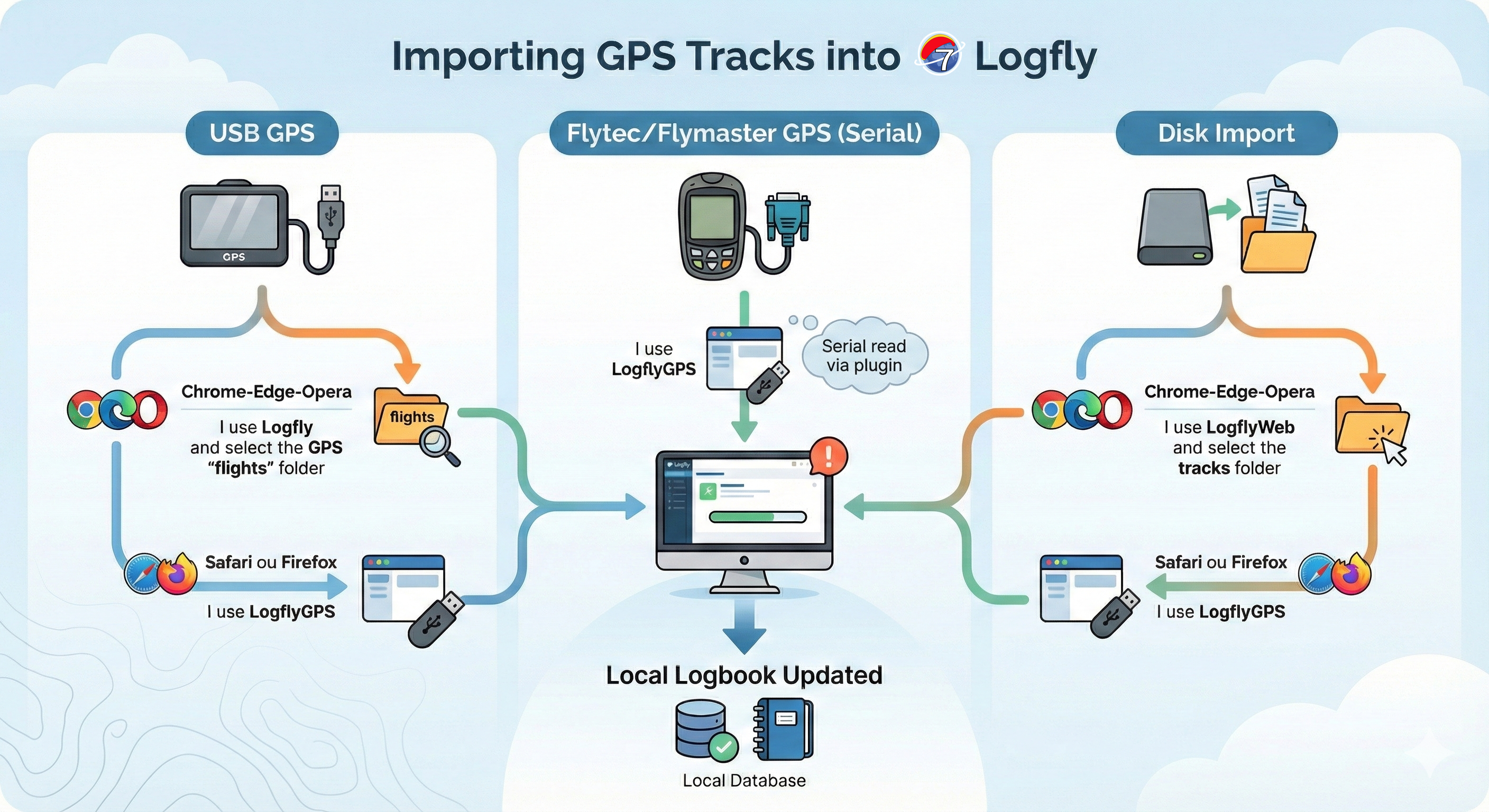
For security reasons, Logfly can no longer execute silent disk exploration for GPS recognition and filtering traces to import.
For each USB-connected GPS, an information message explains how to designate the GPS on the computer. For users of Chrome, Edge, or Opera, after designating the folder concerned, it is enough to respond 'Yes' to the authorization request. The automatic exploration takes place, and the flight log table from the GPS appears as in previous versions.
This possibility of authorization does not exist for Safari and Firefox users.
No incoming communication with the serial port is possible; therefore, direct reading of Flytec and Flymaster is no longer possible.
Therefore, for Safari and Firefox users and users of GPS connected via a serial cable, there will be a solution: LogflyGPS. A classic installed program on your machine. Naturally, users with access to Chrome, Edge, or Opera can choose to use LogflyGPS.