Flight without GPS tracking
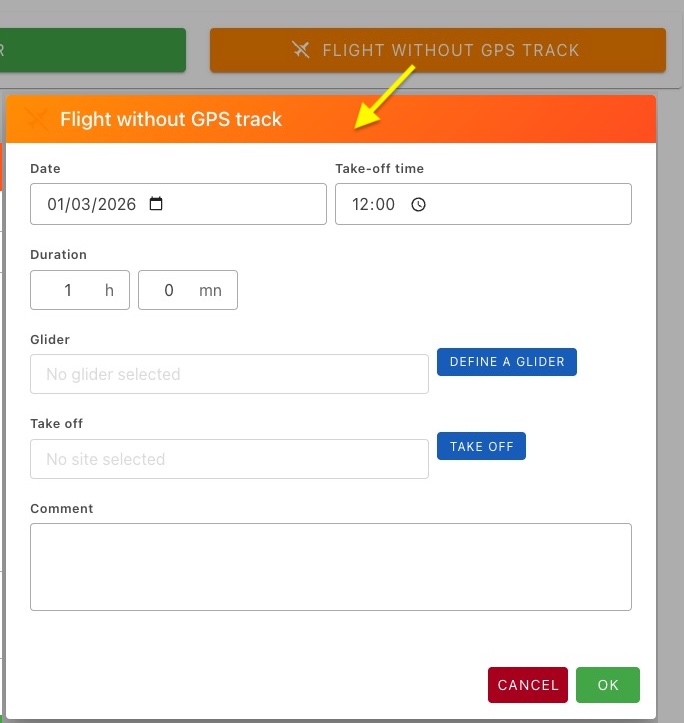
Date, Time, Duration
By default, the proposed date is the current day, the takeoff time 12h00, and the flight duration one hour.
- direct input or click on the calendar icon
- direct input or click on the clock icon
- enter the number of hours and minutes.
Define a glider
A click on the button displays a window with two zones :
- Choose an existing glider: Select the relevant glider from a list of gliders listed in the logbook, sorted in reverse chronological order (the most recent ones first). Click on Validate
- Or new glider: Enter a new glider name and click on Validate
Takeoff
A click on the button displays a window with two zones :
- Choose a site from the logbook: Choose from the file Sites. Be careful, only sites labeled Takeoff will be accessible
- Create a new site: The window for creating a new site appears. Consult the Site page for details.
Logbook
In the logbook, If there is no track for the flight, the context menu will include two specific options
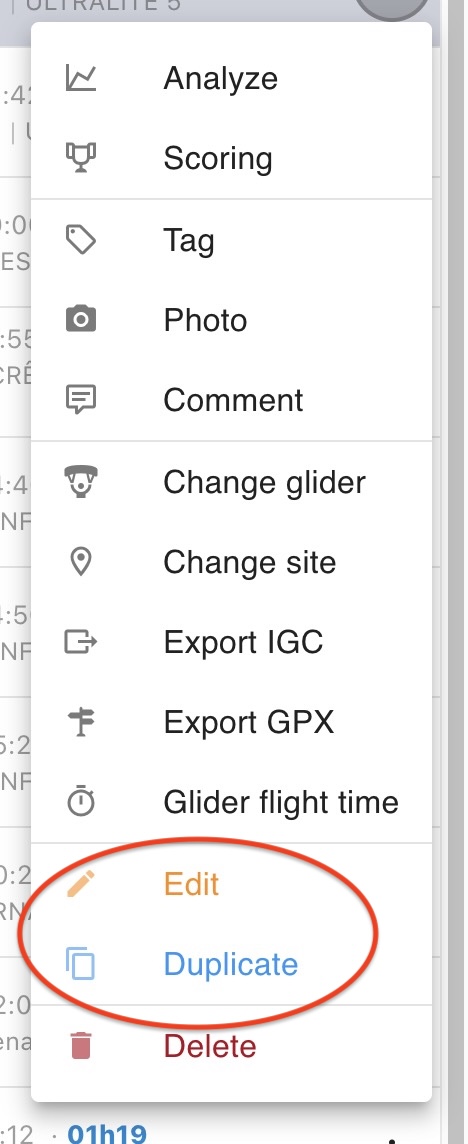
- Edit: The flight without track can be modified
- Copy: If you frequently perform the same flight without taking a GPS, it will be possible to duplicate it easily. It will only be necessary to modify the required fields for a new registration. A check prevents the entry of a flight on the same date and at the same time