Flytec
Flytec Driver Installation
Flytec was acquired by Naviter and no longer provides support.
A few online reads suggested that it is possible to install a vintage driver (2008) successfully on recent versions of Windows. We tested this installation with success for a Flytec 6020 and a Flytec 6015.
The IO-Cable_PL-2303_Drivers-Generic_Windows PL2303_Prolific driver from 2008 is available on this GitHub repository. Here are the installation steps:
- Decompress the downloaded zip file
- Run the _PL2303_Prolific_GPS_1013_20090319.exe file
- Connect the GPS vario
- Go to the Control Panel
- Device Manager
- In principle, the GPS is not recognized by your computer
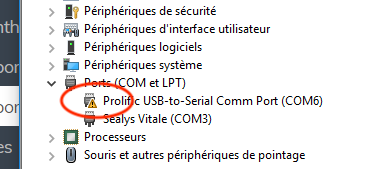
- Right-click on Prolific-to-Serial Comm Port
- Choose Update driver
- Option Browse my computer for driver software
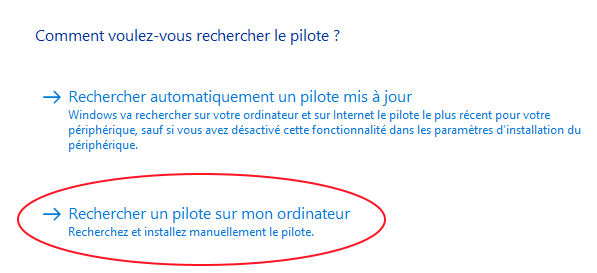
- Choose "Choose from a list of available drivers"
- A window appears with at least two drivers: the one that didn't work and the one just installed
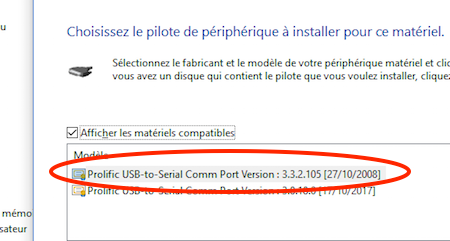
- Choose the version dated October 27, 2008
- Enjoy