Change glider
Change glider
The glider name can originate from two sources:
- IGC Track: If the track file is in the IGC format, it may contain the glider name (record type HFGTY or HPGTY or HOGTY). This name must be set up in the GPS settings. It will be incorporated into the IGC file by the device
- Logfly Settings: It is possible to define a glider name in the Logfly settings under Support/Settings
When updating the logbook with new flights, the glider name incorporated into the IGC trace takes priority. If it is null, Logfly searches for a glider name in the parameter file. If it is null, the glider name is left blank in the logbook.
Tip
- To change the glider name for a single flight, select the Change glider option in the context menu
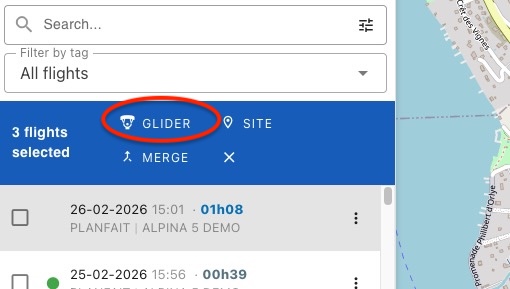
- For multiple flights, tick the relevant flights and use the Change glider option from the multi-select menu
Change
The Change glider option displays a window with two areas.
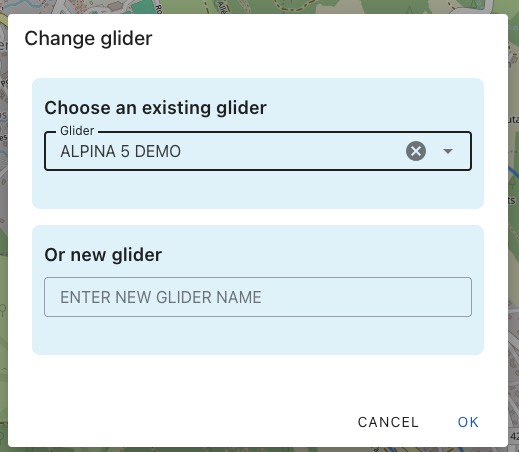
Choose an Existing glider
A list of gliders listed in the logbook sorted by reverse chronological order (most recent first). Select the relevant glider and click on Ok
Or New glider
Enter a new glider name and click on Ok
Consistency
Flight time statistics are based on the exact glider name. A glider entered once with the name 'OMEGA 12 BIS' and another time with 'OMEGA 12BIS' will result in two different gliders displayed in the statistics.
To verify the consistency of glider names, use the search area for verification.
Multiple changes
You can change the name of the glider for several flights in a single operation.
Tick the relevant flights and a blue bar will appear under the search field. Click on the Glider option.