Launch
First Use
You need to specify which logbook to use. The program offers two options:
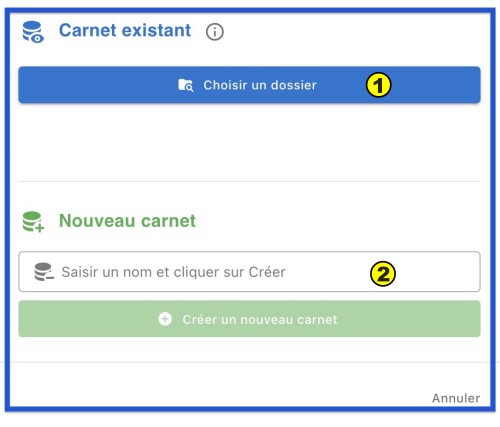
1. Choose a Folder
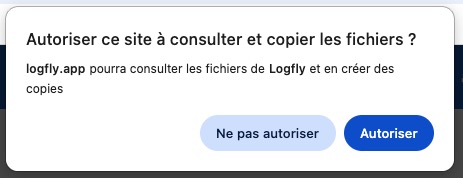
You have already used Logfly (V5, V6, V7), and there is an existing logbook. You will need to select the folder where this logbook is located. By default in versions 4,5,6 the folder was named Logfly and was located in the Documents folder. Use the selector to validate the folder. The first time you do this, authorization will be requested.
This action will fill a list with detected logbooks:
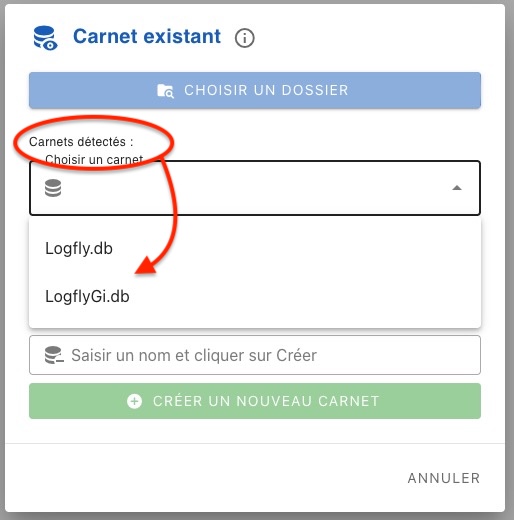
Select the relevant logbook.
2. New logbook
You want to create a new logbook, enter a name without extension. Use the file selector to choose the folder where this logbook will be saved.
Subsequent Usage
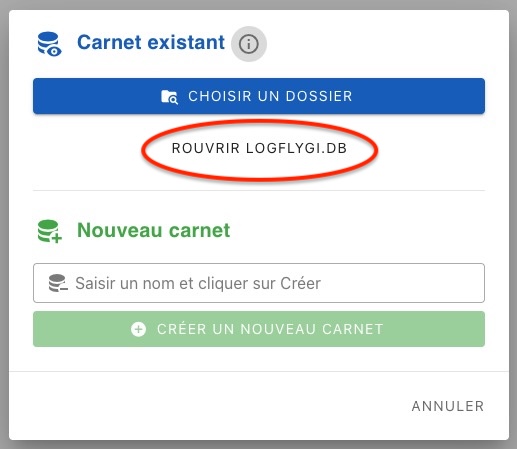
Logfly will automatically offer to reopen the last used logbook
Summary
flowchart TD
    %% --- DEFINITION OF CLASSES ---
    classDef start fill:#0288D1,stroke:#01579B,stroke-width:3px;
    classDef option fill:#E1BEE7,stroke:#8E24AA,stroke-width:2px,rx:5,ry:5;
    classDef step fill:#BBDEFB,stroke:#1976D2,stroke-width:1px,rx:5,ry:5;
    classDef final fill:#FFECB3,stroke:#FF6F00,stroke-width:2px,rx:5,ry:5;

    linkStyle default stroke:#78909C,stroke-width:2px,fill:none;

    %% --- STRUCTURE ---
    A{"<span style='color:white;font-weight:bold'>First Use</span>"}

    A --> B("<span style='color:#4A148C;font-weight:bold'>Existing Logbook 1️⃣</span>")
    A --> C("<span style='color:#4A148C;font-weight:bold'>Create Logbook 2️⃣</span>")

    %% Left Branch
    B --> |"Choose Folder"| D("<span style='color:#0D47A1'>Logfly 5,6<br>Default<br>Documents/Logfly</span>")
    D --> |"Select Logbook"| E@{ shape: notch-rect, label: "<span style='color:#BF360C;font-weight:bold'>Logfly 5,6<br>Default<br>Logfly.db</span>" }

    %% Right Branch
    C --> F("<span style='color:#0D47A1'>Click Create Button</span>")
    F --> G("<span style='color:#0D47A1'>Enter Name</span>")
    G --> |"Choose Folder"| H@{ shape: notch-rect, label: "<span style='color:#BF360C;font-weight:bold'>Validate<br>Registration</span>" }

    %% --- ASSIGNMENT OF CLASSES (SEPARATELY FOR ERROR PREVENTION) ---
    class A start;
    class B,C option;
    class D,F,G step;
    class E,H final;