Mac Spotlight
When a USB device is first connected to a Mac, the initial read operation can be slow. This phenomenon is due to the indexing process performed by Spotlight.
Spotlight is a file search system on Macs that allows for quick searching of documents, files, and even text within documents and files through indexing. This means that all content must be examined. Once indexing is complete, searching for an expression becomes very efficient.
Most GPS USB devices do not have the same read performance as "true" USB keys. The Spotlight indexing process is therefore penalizing, especially since it serves no purpose in this case. Indexing is performed on each first session read, which is why subsequent reads are ultra-fast.
The solution is to prevent Spotlight from indexing the GPS. This can be done through System Preferences (see Apple Support page). Disadvantage: this operation is not persistent and must be repeated each time the device is connected.
To make it permanent, you need to use Terminal.
After plugging in the GPS and waiting for it to appear in the Finder, launch Terminal:
- Open the Finder (file explorer)
- Click on the Applications button
- Click on the Utilities button
- Double-click the Terminal icon
- Type the following command, replacing
/Volumes/with the name of the GPS as it appears in the Finder. Below is an example for a Skytraxx that appears in the Finder as a disk named_SKYTRAXX_.The user password is required. There is no visible cursor. Enter your password and validate with Enter.sudo mdutil -i off /Volumes/SKYTRAXX
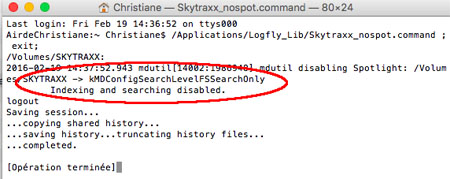
If the operation is successful, you will receive this message:
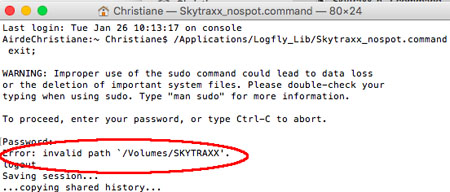
If the Skytraax was not yet visible in the Finder, you will receive an error message:
You can verify the validity of the operation by checking Spotlight's settings.
- Go to System Preferences [ Click Apple icon top left ]
- Click on the Spotlight icon
- Click on Security
- The Skytraxx now appears in the Confidentiality window. If it is plugged in, of course…
The gain is more than significant. On a busy year, Logfly 6 took 159 seconds to display content at first access after plugging in. After preventing Spotlight from indexing the Skytraxx, Logfly 6 takes 19 seconds.